web开发-从facebook的in-app browser浏览器中网页,唤起Safari 或者 谷歌chrome浏览器


一、概要
安卓Android系统是可以实现从Facebook中的网页,唤起默认的浏览器。
但是iOS最多能实现打开Safari,但是不能指定具体的网址。
二、在安装了facebook的iPhone中,通过网页唤起Safari
2.1 【不成功】:直接使用https 或者 http链接
js
window.location.href = 'https://www.baidu.com'没有Facebook的“跳转外部浏览器”的弹窗出现,依然还是在Facebook的browser中刷新
2.2 【不成功】:通过ftp协议使用中转用的index.html
facebook中打开的网页
js
window.location.href = `ftp://43.xxx.xxx.xxx/index.html`中转网页中
js
window.open(”https://www.baidu.com”, “_self”);Safari已经不支持ftp协议。
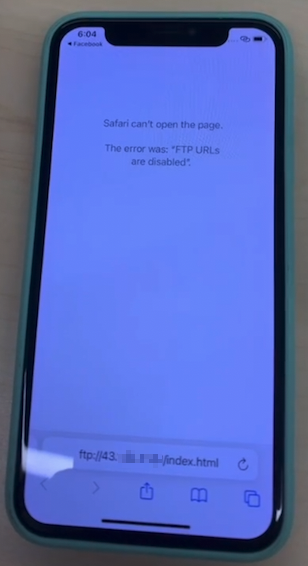
能弹出Facebook的“跳转外部浏览器”的弹窗,点“确定”后可以唤起Safari,但是Safari中的中转index.html不能解析,Safari的白色提示页面提示“ftp url is blocked”
2.3 【半成功】:通过x-web-search://协议
js
const currentLink = location.href
const link = currentLink.replace('https://', '').replace('http://', '').replace('www.', '')
window.location.href = `x-web-search://${link}`
能弹出Facebook的“跳转外部浏览器”的弹窗,点“确定”后可以唤起Safari,但是进入的是Safari的默认搜素引擎的搜索界面,搜索输入框中是link的参数部分
如果使用以下的方式,那么只会出现一个网址是空的Safari界面
js
window.location.href = `x-web-search://`三、在iOS上唤起iOS版谷歌浏览器
js
window.location = `googlechrome://${link}`// ios to chrome四、在安装了Facebook的Android手机中唤起chrome
js
const currentLink = location.href
const link = currentLink.replace('https://', '').replace('http://', '').replace('www.', '')

if (ua.isAndroid()) {
    window.location.href = `intent://${link}#Intent;scheme=https;end`// android
}
或者使用:
js
<script>
    function isFacebookApp() {
        var ua = navigator.userAgent || navigator.vendor || window.opera;
        return (ua.indexOf("FBAV") > -1) || (ua.indexOf("FBAN") > -1);
    }
if (isFacebookApp()) {
    var currentLink = location.href;
    if (currentLink.indexOf('https') > -1) {
        var currentLink = currentLink.replace('https://', '');
        currentLink = currentLink.replace('www.', '');
        var chromeLink = "intent://" + currentLink + "#Intent;scheme=https;package=com.android.chrome;end";
        window.location.href = chromeLink;
    }
    if (currentLink.indexOf('http') > -1) {
        var currentLink = currentLink.replace('http://', '');
        currentLink = currentLink.replace('www.', '');
        var chromeLink = "intent://" + currentLink + "#Intent;scheme=http;package=com.android.chrome;end";
        window.location.href = chromeLink;
    }
}
</script>
五、 以下是一些测试过跳转的不成功代码逻辑
js
// tryOpenDefault(() => {
        //     window.open(url, '_blank');
        // }, 1000)

        // tryOpenDefault(() => {
        //     window.location.href = url;
        // }, 2000)

        // tryOpenDefault(() => {
        //     window.open(url, '_system');
        // }, 3000)

        // tryOpenDefault(() => {
        //     window.location.href = 'intent://' + url + '#Intent;' + 'scheme=https;end';
        // }, 4000)

        // 会弹出跳转box,但是又快速退出回到帖子页
        // tryOpenDefault(() => {
        //     var a = document.createElement('a');
        //     a.setAttribute('href', url);
        //     a.setAttribute('target', '_blank'); // Ensures it opens in a new tab/window
        //     a.click();
        // }, 5000)


  // window.location.href = `prefs://${link}`

                // window.location.href = `x-safari-https://${link}` // box but not jump

                // window.location.href = `site://${link}` // not work

                // not work
                // var a = document.createElement('a');
                // a.setAttribute('href', currentLink);
                // a.setAttribute('target', '_blank'); // Ensures it opens in a new tab/window
                // a.click();

                // not work again
                // var a = document.createElement('a');
                // a.setAttribute('href', currentLink);
                // a.setAttribute('target', '_blank'); // Ensures it opens in a new tab/window
                // var dispatch = document.createEvent("HTMLEvents");
                // dispatch.initEvent("click", true, true);
                // a.dispatchEvent(dispatch);

                // window.open(location.href, '_blank') // not work
                // window.location.href = location.href // not work
                // window.location.href = `safari://${currentLink}` // can prompt box, but can not jump still
                // window.location.href = `safari://${link}`// can prompt box, but can not jump
                // window.location.href = `googlechrome://${link}`// can open chrome
六、总结
目前经过各种尝试发现,在安卓上确实是可以通过intent的方式唤起系统的浏览器,但是iOS的Safari浏览器,并没有合适的方法唤起浏览器并打开对应的网址。
所以如果在iOS上的Facebook或者是其他app的内置浏览器(即in-app browser)上,想仅仅只通过web中来实现是做不到的。除非这个in-app浏览器所在的app是可以内置我们自己的代码的。
因为在iOS系统中,app打开Safari的方式都是通过iOS的系统API:
js
[[UIApplication sharedInstance] openUrl:@"https://xxx.xxx.xxx"]这样的方式来实现跳转Safari的。所以除非web和app有通信机制,调用iOS原生代码的这个API。
而且即使通过在Mac上的应用程序右键Safari浏览器,点击“查看内容”,打开Safari应用的info.plist,查看Safari的URL Scheme,也就只有有限的http、https、ftp等深链接。
我在Mac上测试时,发现是可以通过以下代码:(有点忘了是不是safari开头,应该还有一个x-safari-http的scheme头,还是webkit:这个)
js
window.location.href = `safari://43.xxx.xxx.xxx/index.html`在Mac上是可以从谷歌Chrome浏览器跳转打开Safari的,但是在移动端是不行的。
所以在iOS的第三方app的内置浏览器中,想打开系统Safari浏览器,最好还是要做一个引导的浮层,指向右上角的三个点,引导用户主动点击Facebook等第三方app的“打开外部浏览器”选项。
Keine Kommentare, erstmals kommentieren.