taro中将vite构建修改为webpack构建

这篇文章记录我在开发小程序过程中遇到的问题和解决方案,希望对一些同学有帮助。问题是taro的4.1.7或4.1.8版本编译为支付宝小程序时遇到的问题。
问题
node_modules/lottie-web/build/player/lottie.js (14422:32) Use of eval in "node_modules/lottie-web/build/player/lottie.js" is strongly discouraged as it poses security risks and may cause issues with minification.
node_modules/@nutui/lottie-miniprogram/miniprogram_dist/index.js (9:157644) Use of eval in "node_modules/@nutui/lottie-miniprogram/miniprogram_dist/index.js" is strongly discouraged as it poses security risks and may cause issues with minification.
node_modules/@nutui/lottie-miniprogram/miniprogram_dist/index.js (9:157715) Use of eval in "node_modules/@nutui/lottie-miniprogram/miniprogram_dist/index.js" is strongly discouraged as it poses security risks and may cause issues with minification.
✓ 1126 modules transformed.
/Users/xxx/node_modules/@tarojs/vite-runner/dist/mini/emit.js:188
if (chunk.type === 'asset') {
^
TypeError: Cannot read properties of undefined (reading 'type')
at Object.set (/Users/xxx/node_modules/@tarojs/vite-runner/src/mini/emit.ts:191:25)
at Object.fn (/Users/xxx/node_modules/@tarojs/plugin-platform-alipay/src/program.ts:121:32)
at Kernel.(/Users/xxx/node_modules/@tarojs/service/src/Kernel.ts:307:34)
at Generator.next ()
at /Users/xxx/node_modules/@tarojs/service/dist/Kernel.js:8:71
at new Promise ()
at __awaiter (/Users/xxx/node_modules/@tarojs/service/dist/Kernel.js:4:12)
at /Users/xxx/node_modules/@tarojs/service/src/Kernel.ts:306:24
at _next0 (eval at create (/Users/xxx/node_modules/tapable/lib/HookCodeFactory.js:71:10),:17:17)
at eval (eval at create (/Users/xxx/node_modules/tapable/lib/HookCodeFactory.js:71:10),:41:1)
Node.js v22.19.0
问题截图:
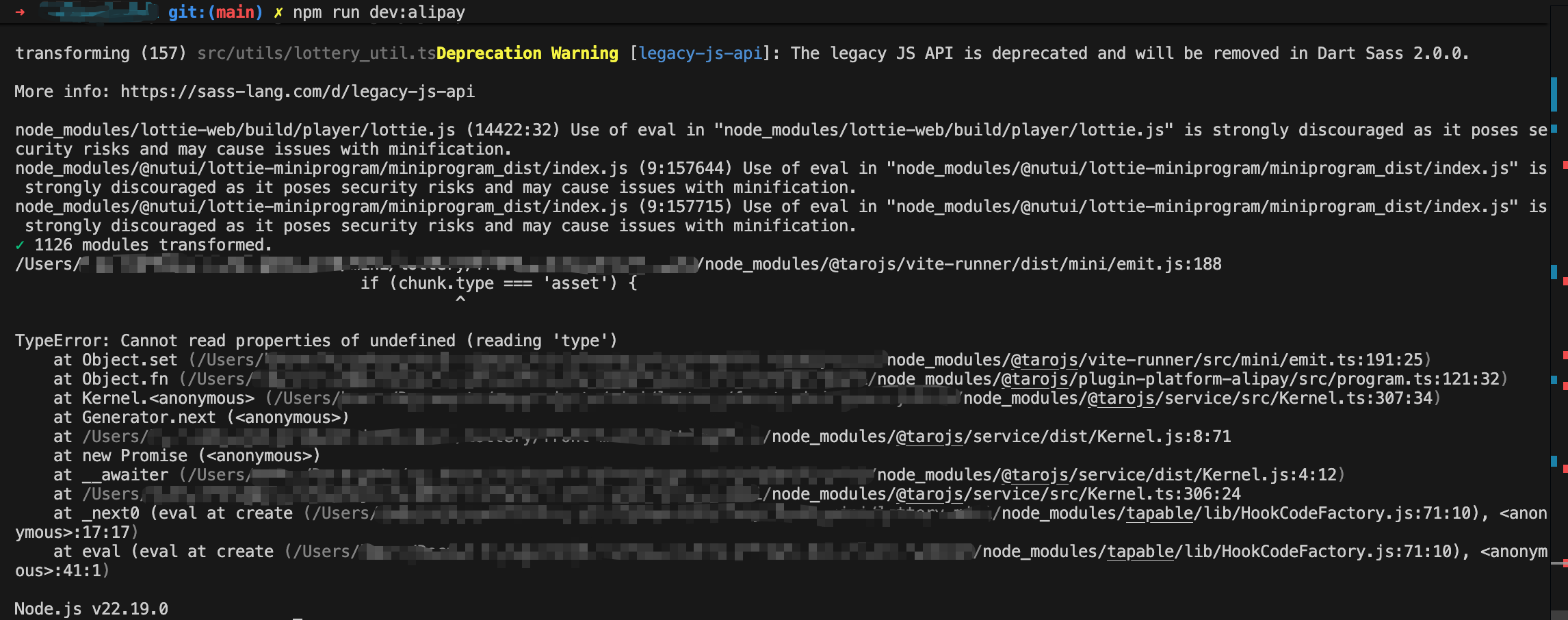
这个问题其实很多人都有在碰到,主要是由于taro新版本出的bug,那我们要做的其实无外乎2种方式,要么回退taro的cli和依赖版本到之前的一个正常版本,或者将vite改为webpack的编译配置。
解决方案
我倾向于保持taro cli的最新版本,然后将vite构建改为webpack构建,所以接下来我要记录的是如何将我的工程改为webpack构建的过程。
我当前的taro环境:
terminal
👽 Taro v4.1.7

  Taro CLI 4.1.7 environment info:
    System:
      OS: macOS 26.1
      Shell: 5.9 - /bin/zsh
    Binaries:
      Node: 22.19.0 - /Users/xxx/.nvm/versions/node/v22.19.0/bin/node
      Yarn: 1.22.22 - /Users/xxx/.nvm/versions/node/v22.19.0/bin/yarn
      npm: 10.9.3 - /Users/xxx/.nvm/versions/node/v22.19.0/bin/npm
    npmPackages:
      @tarojs/cli: 4.1.7 => 4.1.7
      @tarojs/components: 4.1.7 => 4.1.7
      @tarojs/helper: 4.1.7 => 4.1.7
      @tarojs/plugin-framework-react: 4.1.7 => 4.1.7
      @tarojs/plugin-html: 4.1.7 => 4.1.7
      @tarojs/plugin-platform-alipay: 4.1.7 => 4.1.7
      @tarojs/plugin-platform-h5: 4.1.7 => 4.1.7
      @tarojs/plugin-platform-harmony-hybrid: 4.1.7 => 4.1.7
      @tarojs/plugin-platform-jd: 4.1.7 => 4.1.7
      @tarojs/plugin-platform-qq: 4.1.7 => 4.1.7
      @tarojs/plugin-platform-swan: 4.1.7 => 4.1.7
      @tarojs/plugin-platform-tt: 4.1.7 => 4.1.7
      @tarojs/plugin-platform-weapp: 4.1.7 => 4.1.7
      @tarojs/react: 4.1.7 => 4.1.7
      @tarojs/runtime: 4.1.7 => 4.1.7
      @tarojs/shared: 4.1.7 => 4.1.7
      @tarojs/taro: 4.1.7 => 4.1.7
      @tarojs/vite-runner: 4.1.7 => 4.1.7
      babel-preset-taro: 4.1.7 => 4.1.7
      eslint-config-taro: 4.1.7 => 4.1.7
      react: ^18.0.0 => 18.3.1
1. 升级taro cli到最新版本
使用以下命令
terminal
taro update self 4.1.82. 升级工程project的taro配置
使用以下终端命令
terminal
taro update project 4.1.8我在升级的时候遇到问题:
terminal error
⚠ npm error code ERESOLVE
⚠ npm error ERESOLVE could not resolve
npm error
npm error While resolving: xxx-mini@1.0.0
npm error Found: @tarojs/plugin-framework-react@4.1.7
npm error node_modules/@tarojs/plugin-framework-react
npm error   @tarojs/plugin-framework-react@"4.1.8" from the root project
npm error
npm error Could not resolve dependency:
npm error @tarojs/plugin-framework-react@"4.1.8" from the root project
npm error
npm error Conflicting peer dependency: @tarojs/shared@4.1.8
npm error node_modules/@tarojs/shared
npm error   peer @tarojs/shared@"4.1.8" from @tarojs/plugin-framework-react@4.1.8
npm error   node_modules/@tarojs/plugin-framework-react
npm error     @tarojs/plugin-framework-react@"4.1.8" from the root project
npm error
npm error Fix the upstream dependency conflict, or retry
npm error this command with --force or --legacy-peer-deps
npm error to accept an incorrect (and potentially broken) dependency resolution.
npm error
npm error
npm error For a full report see:
npm error /Users/xxx/.npm/_logs/2025-11-20T09_07_03_753Z-eresolve-report.txt
⚠ npm error A complete log of this run can be found in: /Users/xxx/.npm/_logs/2025-11-20T09_07_03_753Z-debug-0.log从上面的报错中看出错误在:@tarojs/plugin-framework-react@4.1.7和当前project配置(taro 4.1.8)不匹配,所以检查一下package.json中@tarojs/plugin-framework-react是否是4.1.8,发现package.json中的配置均以被修改为4.1.8了,那么问题就是出在没有删掉的package-lock.json和node_modules。
所以删除package-lock.json和node_modules后,重新npm install。
3. 将vite修改为webpack编译配置
首先要将package.json文件中的一些vite等依赖去掉,
比如(如果有的话):
依赖项
...
    "@vitejs/plugin-react": "^4.3.0",
    "@tarojs/vite-runner": "4.1.8",
    "vite": "^4.2.0",
    "vite-plugin-importer": "^0.2.5",
    "vite-tsconfig-paths": "^5.1.4"
...
然后确保引入依赖:
新依赖
@tarojs/webpack5-runner4. 将config/index.ts中的vite构建改为webpack
将defineConfig的配置从vite改为webpack5。
比如:
config/index.ts
...
export default defineConfig<"vite">(async (merge, { command, mode }) => {
  const baseConfig: UserConfigExport<"vite"> = {
...
     compiler: {
        type: "vite",
...
改为:
config/index.ts
...
export default defineConfig<"webpack5">(async (merge, { command, mode }) => {
  const baseConfig: UserConfigExport<"webpack5"> = {
...
     compiler: {
        type: "webpack5",
...
5. 修改babel.config.js中的构建配置
修改前:
babel.config.js
// babel-preset-taro 更多选项和默认值:
// https://github.com/NervJS/taro/blob/next/packages/babel-preset-taro/README.md
module.exports = {
  presets: [
    [
      "taro",
      {
        framework: "react",
        ts: true,
        compiler: "vite",
      },
    ],
  ],
  // plugins: [], // 彻底清空插件,避免任何 Babel 导入插件干扰
};
修改后:
babel.config.js
// babel-preset-taro 更多选项和默认值:
// https://github.com/NervJS/taro/blob/next/packages/babel-preset-taro/README.md
module.exports = {
  presets: [
    [
      "taro",
      {
        framework: "react",
        ts: true,
        compiler: "webpack5",
      },
    ],
  ],
  // plugins: [], // 彻底清空插件,避免任何 Babel 导入插件干扰
};然后,同样删除掉package-lock.json和node_modules,然后npm install。
6. 运行npm run dev:weapp报错
部分报错
...
 Webpack
  Compiled with some errors in 7.41s

✖ Errors:

resolve '@/utils/dl_util' in '/Users/xxx/src/pages/dt_play'
  Parsed request is a module
  using description file: /Users/xxx/package.json (relative path: ./src/pages/dt_play)
    Field 'browser' doesn't contain a valid alias configuration
    resolve as module
      /Users/xxx/src/pages/dt_play/node_modules doesn't exist or is not a directory
      /Users/xxx/src/pages/node_modules doesn't exist or is not a directory
      /Users/xxx/src/node_modules doesn't exist or is not a directory
      looking for modules in /Users/xxx/node_modules
        /Users/xxx/node_modules/@/utils doesn't exist
...
从报错可以看出,是由于我之前在vite构建那个时候配置过路径别名,但是改为webpack后别名没有识别。
7. 解决别名问题
- 需要引入dev依赖:
tsconfig-paths-webpack-plugin,安装这个依赖。 - 回到config/index.ts配置文件,去使用这个插件
config/index.ts
...
import TsconfigPathsPlugin from 'tsconfig-paths-webpack-plugin'
...
mini {
...
      webpackChain(chain) {
        // 这里定义 webpack 配置
        chain.resolve.plugin("tsconfig-paths").use(TsconfigPathsPlugin);
      },
...
},
...
h5: {
...
      webpackChain(chain) {
        chain.resolve.plugin("tsconfig-paths").use(TsconfigPathsPlugin);
      },
...
}
...
8. 重新运行
运行就OK了。
以上就是所有了,欢迎大家一起讨论细节.
暂无评论,快来发表第一条评论吧