ITMS-90683: Missing purpose string in info.plist. NSAppleMusicUsageDescription - flutter - permission_handler

背景
在开发flutter的过程中没有出现异常,但是在提交iOS app到审核的时候,出现了报错,提示缺少在info.plist中的权限描述。问题如下截图所示:
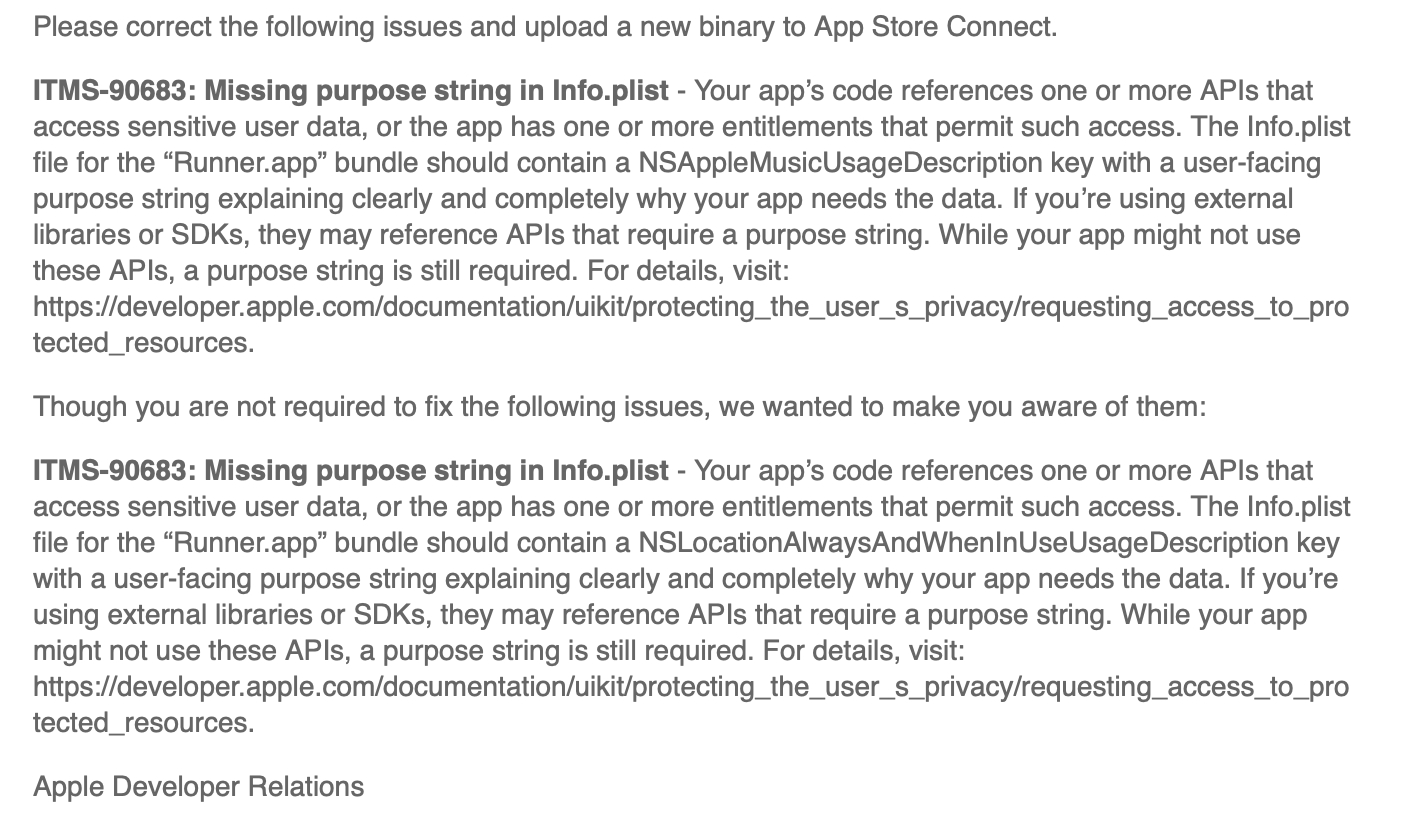
ITMS-90683: Missing purpose string in info.plist
问题分析
从截图中可以看出,Apple提示我的iOS工程中缺少NSAppleMusicUsageDescription和NSLocationAlwaysWhenInUseUsageDescription这2个权限的描述。
开发过iOS的小伙伴肯定知道,如果我们在代码中有对隐私权限的调用(相册、相机、定位、麦克风、电话簿等),如果没有在主target中的info.plist添加目的描述,Apple是不允许的,并且Apple还会让开发者在appconnect提审网站上对app使用到的一些隐私、加密等内容做勾选。
如果是在iOS纯原生代码开发中,我们是比较快的定位问题的,但是在flutter开发的时候,由于有时候加的flutter package太多,导致我们容易遗忘有哪些权限描述需要及时在info.plist中进行填写,纯属是一个细心问题。
这样的问题,我也在网上找到过有人也犯过同样的错误:https://github.com/Baseflow/flutter-permission-handler/issues/302
问题解决
在flutter中,我们通常使用permission_handler这个库来检查和请求业务功能所需的权限。
说到这个库,有一个问题需要提到,就是,如果有同学没有按照文档的ios setup部分将iOS工程进行配置的话,会出现权限虽然获取到了,但是check权限状态时却是foreverDenied的问题。
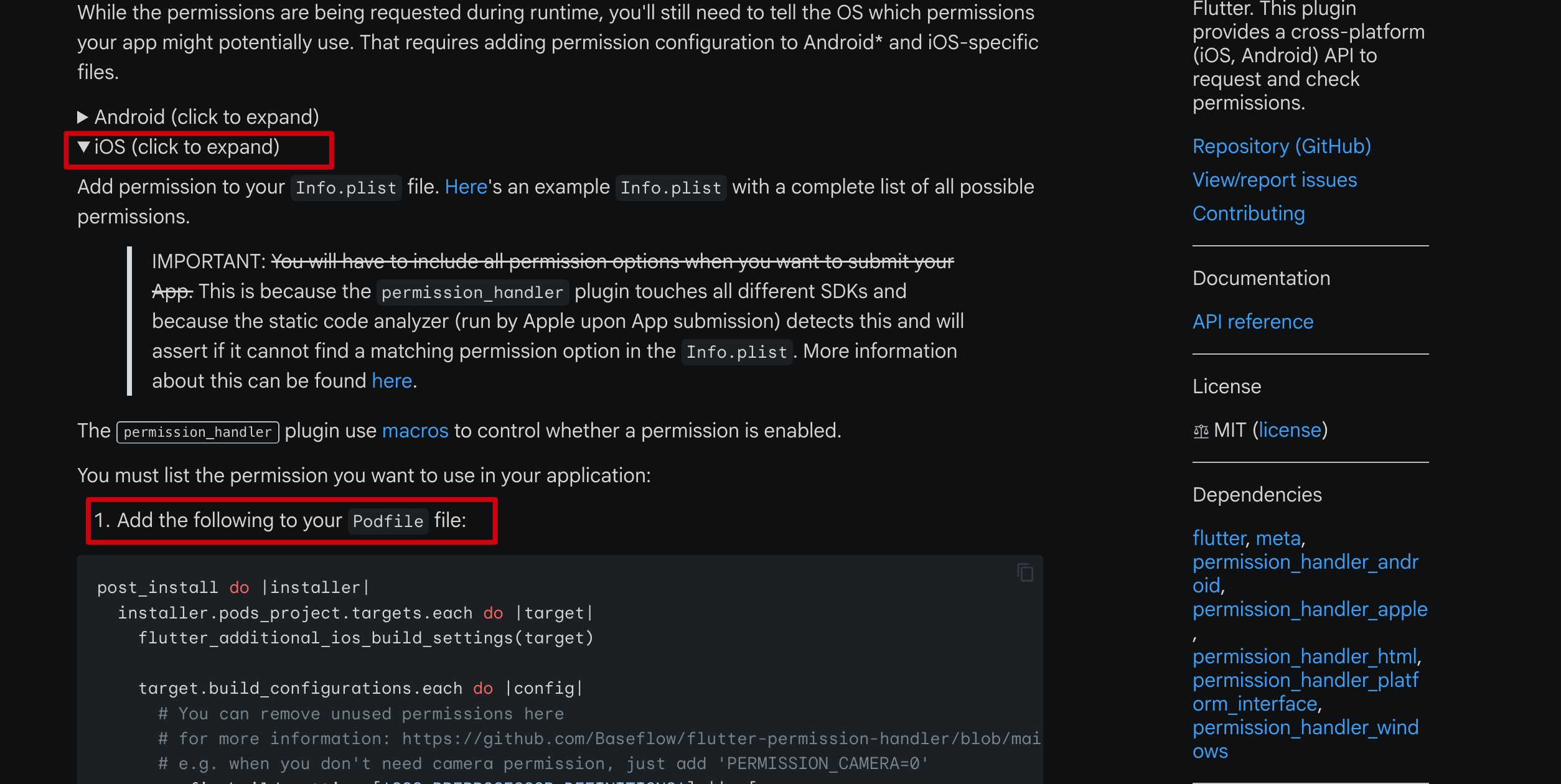
这个问题一定要切记。
permission-handler这个pub的链接是:https://pub.dev/packages/permission_handler
那么,当你使用flutter开发的时候,如果是遇到类似Missing purpose string in info.plist这样的报错,你就应该首先检查permission_handler这个库的配置是否正确。
其中最不容易发现的是,问题不在代码,而是在Podfile文件中,我这里贴出我的Podfile文件,供大家参考:
Podfile
# Uncomment this line to define a global platform for your project
platform :ios, '13.0'

# CocoaPods analytics sends network stats synchronously affecting flutter build latency.
ENV['COCOAPODS_DISABLE_STATS'] = 'true'

project 'Runner', {
  'Debug' => :debug,
  'Profile' => :release,
  'Release' => :release,
}

def flutter_root
  generated_xcode_build_settings_path = File.expand_path(File.join('..', 'Flutter', 'Generated.xcconfig'), __FILE__)
  unless File.exist?(generated_xcode_build_settings_path)
    raise "#{generated_xcode_build_settings_path} must exist. If you're running pod install manually, make sure flutter pub get is executed first"
  end

  File.foreach(generated_xcode_build_settings_path) do |line|
    matches = line.match(/FLUTTER_ROOT\=(.*)/)
    return matches[1].strip if matches
  end
  raise "FLUTTER_ROOT not found in #{generated_xcode_build_settings_path}. Try deleting Generated.xcconfig, then run flutter pub get"
end

require File.expand_path(File.join('packages', 'flutter_tools', 'bin', 'podhelper'), flutter_root)

flutter_ios_podfile_setup

target 'Runner' do
  use_frameworks!
  use_modular_headers!

  pod 'KeychainAccess'
  pod 'FBAudienceNetwork','= 6.15.0'

  flutter_install_all_ios_pods File.dirname(File.realpath(__FILE__))
  target 'RunnerTests' do
    inherit! :search_paths
  end
end

post_install do |installer|
  installer.pods_project.targets.each do |target|
    flutter_additional_ios_build_settings(target)
    target.build_configurations.each do |config|
      config.build_settings['SWIFT_VERSION'] = '5.0'  # required by simple_permission
      config.build_settings['ENABLE_BITCODE'] = 'NO'
      # You can remove unused permissions here
      # for more information: https://github.com/BaseflowIT/flutter-permission-handler/blob/master/permission_handler/ios/Classes/PermissionHandlerEnums.h
      # e.g. when you don't need camera permission, just add 'PERMISSION_CAMERA=0'
      config.build_settings['GCC_PREPROCESSOR_DEFINITIONS'] ||= [
        '$(inherited)',

        ## dart: PermissionGroup.calendar
        #'PERMISSION_EVENTS=1',

        ## dart: PermissionGroup.calendarFullAccess
        #'PERMISSION_EVENTS_FULL_ACCESS=1',

        ## dart: PermissionGroup.reminders
        #'PERMISSION_REMINDERS=1',

        ## dart: PermissionGroup.contacts
        #'PERMISSION_CONTACTS=1',

        ## dart: PermissionGroup.camera
        'PERMISSION_CAMERA=1',

        ## dart: PermissionGroup.microphone
        'PERMISSION_MICROPHONE=1',

        ## dart: PermissionGroup.speech
        #'PERMISSION_SPEECH_RECOGNIZER=1',

        ## dart: PermissionGroup.photos
        'PERMISSION_PHOTOS=1',

        ## The 'PERMISSION_LOCATION' macro enables the `locationWhenInUse` and `locationAlways` permission. If
        ## the application only requires `locationWhenInUse`, only specify the `PERMISSION_LOCATION_WHENINUSE`
        ## macro.
        ##
        ## dart: [PermissionGroup.location, PermissionGroup.locationAlways, PermissionGroup.locationWhenInUse]
        'PERMISSION_LOCATION=1',
        'PERMISSION_LOCATION_WHENINUSE=0',

        ## dart: PermissionGroup.notification
        'PERMISSION_NOTIFICATIONS=1',

        ## dart: PermissionGroup.mediaLibrary
        #'PERMISSION_MEDIA_LIBRARY=1',

        ## dart: PermissionGroup.sensors
        #'PERMISSION_SENSORS=1',

        ## dart: PermissionGroup.bluetooth
        #'PERMISSION_BLUETOOTH=1',

        ## dart: PermissionGroup.appTrackingTransparency
        'PERMISSION_APP_TRACKING_TRANSPARENCY=1',

        ## dart: PermissionGroup.criticalAlerts
        #'PERMISSION_CRITICAL_ALERTS=1',

        ## dart: PermissionGroup.criticalAlerts
        #'PERMISSION_ASSISTANT=1',
      ]
    end
  end
end那么对照问题截图中的权限:NSAppleMusicUsageDescription和NSLocationAlwaysWhenInUseUsageDescription
然后对照permission_handler库的权限枚举值:
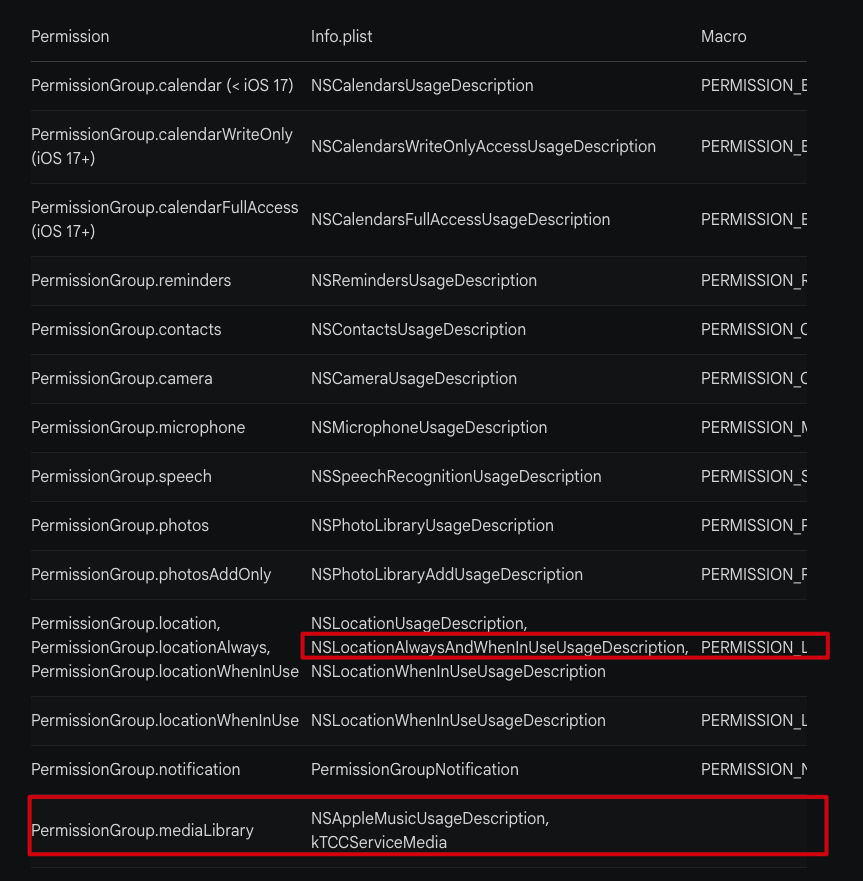
从红色框中的可以在Podfile中对对应的枚举值进行注释(添加#号),没有用到的权限切记要么删除,要么#号注释掉即可。
以上。
暂无评论,快来发表第一条评论吧